Mar 24, 2021
Engineering
Leveraging Backend.AI's Auto-Mount Folder Functionality

Joongi Kim
Co-Founder / CTO
Mar 24, 2021
Engineering
Leveraging Backend.AI's Auto-Mount Folder Functionality
Joongi Kim
Co-Founder / CTO
In this article, we introduce the auto-mount folder feature among Backend.AI's storage support functions, which is uncommon in other container management solutions. By utilizing auto-mount folders, users can easily share programs or configurations they have installed across different compute sessions.
Container File System Overview
First, let's briefly review how containers handle file systems. Unlike virtual machine environments where complete virtual disks are provided, most container environments including Backend.AI operate by creating virtual file system views exclusively for containers using overlay file systems. This allows running completely different distributions while sharing the host and Linux kernel (e.g., running CentOS containers on an Ubuntu host).
In particular, all changes made to the file system while a container is running are maintained as separate overlay layers and deleted when the container terminates. This plays an important role in maintaining container images in their original state with very low performance overhead and ensuring reproducibility of container environments.
Analogy: Hard Security Manager
If this explanation seems complex, think of "Hard Security Manager" instead. If you attended elementary through high school in the late 90s to early 2000s, many of you will remember a program called Hard Security Manager installed in school computer labs. It was a fascinating program that automatically restored hard disk contents to their initial state when you turned off or rebooted the computer. Since various users handling computers often left personal work files without deletion or got viruses through programs downloaded from the internet, it gained popularity as a program that made computer management easier. In other words, you can think of containers as having Hard Security Manager applied by default.
Challenges with Container Volatility
However, when using containers not for application deployment but as development environments where programs are frequently installed or updated, this volatility can be inconvenient for users. Backend.AI is a prime example of this use case. Even though we already provide container images with various open source software pre-installed based on NGC (NVIDIA GPU Cloud) to our customers, there are frequent requests to install additional Python packages.
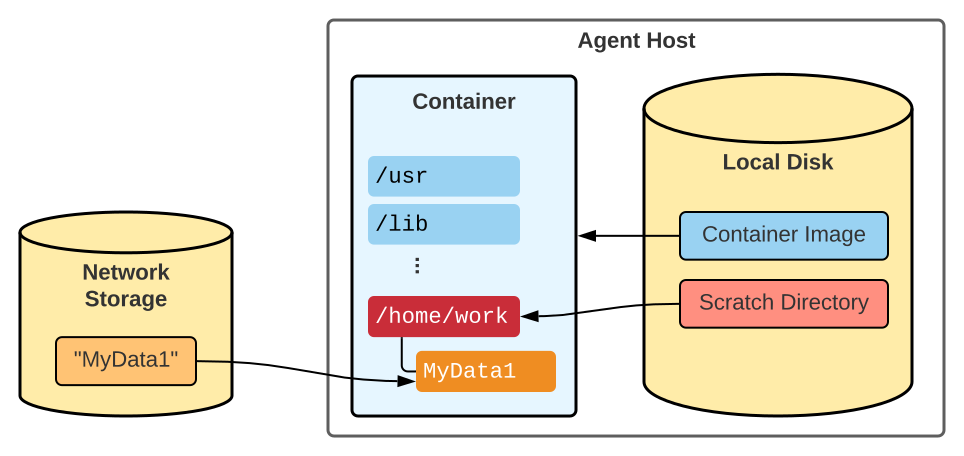
Some customers also request the ability to create container images through docker commit. However, in Backend.AI, the home directory (/home/work) of user sessions is allocated as separate temporary host directories (scratch directories) rather than overlay layers for better I/O performance. While not strictly container overlay layers, they share the characteristic of being automatically deleted when containers terminate (Figure 1).
As a result, even if you "commit" a container to create an image, home directory contents are not included, and furthermore, folders already mounted through the storage folder feature cannot be included in the image in any case (Figures 2 and 3). For these reasons, Backend.AI does not provide functionality corresponding to docker commit, but instead creates new images based on customer requests or internal identification of demand for additional packages.1
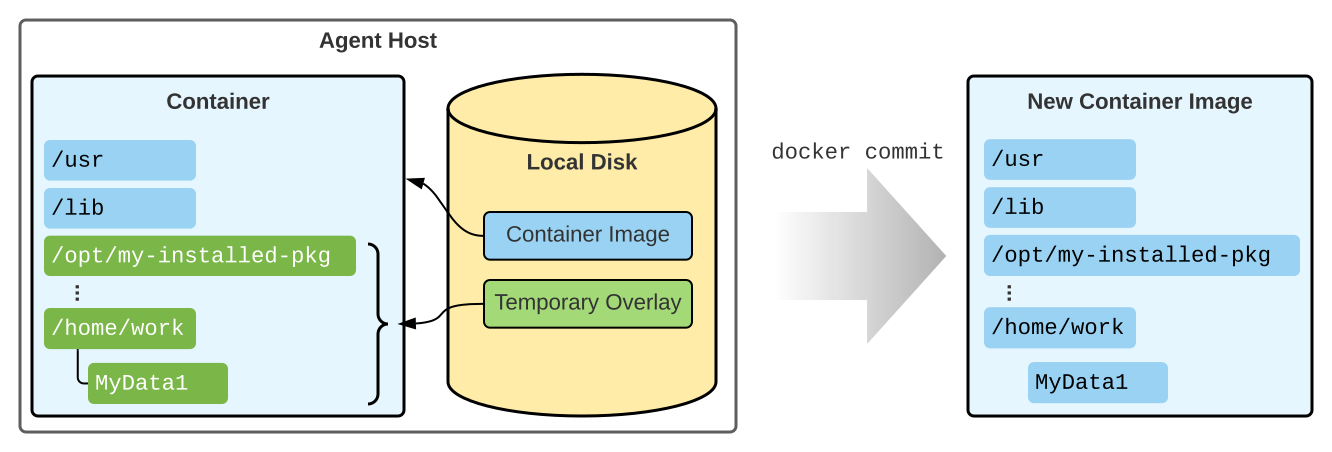
Figure 2. Results of docker commit when using containers without external mounted volumes
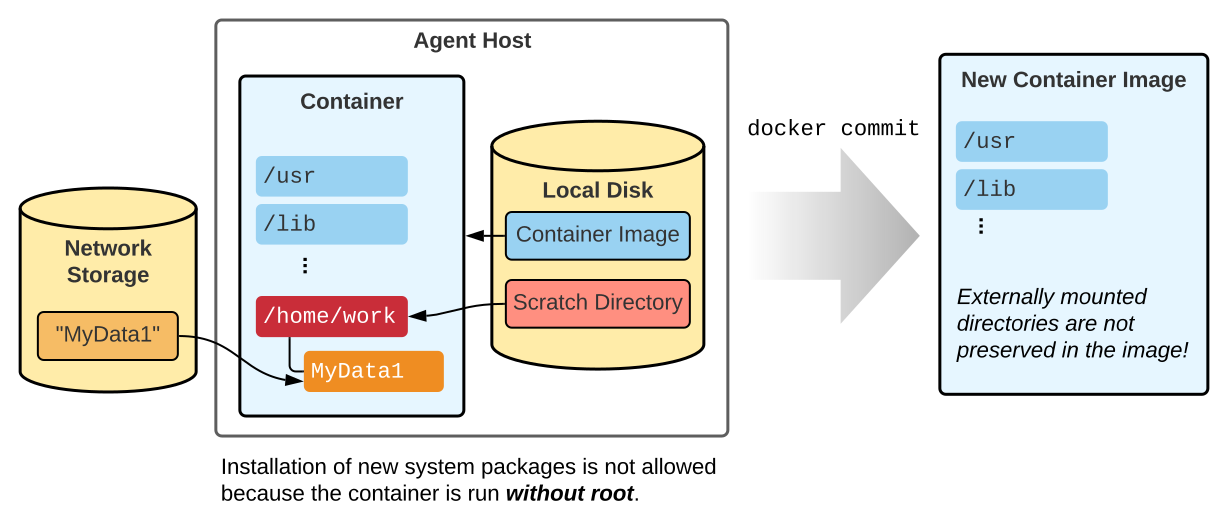
Figure 3. Why Backend.AI session containers cannot be docker committed
Auto-Mount Folders Solution
So is there no convenient way to load and use your own additional packages or configurations regardless of container images? Auto-mount folders are designed to address this limitation.
In typical Linux applications, user-specific configurations or additional data are stored in .local and .config directories under the home directory. In Windows environments, this is equivalent to the hidden AppData folder under the user directory.
Taking advantage of this, when each Backend.AI user creates storage folders with names starting with dots, such as .local and .config, those storage folders are automatically mounted to all sessions of that user. Therefore, you can continue to access personally installed programs or configurations regardless of turning compute sessions on and off (Figure 4).
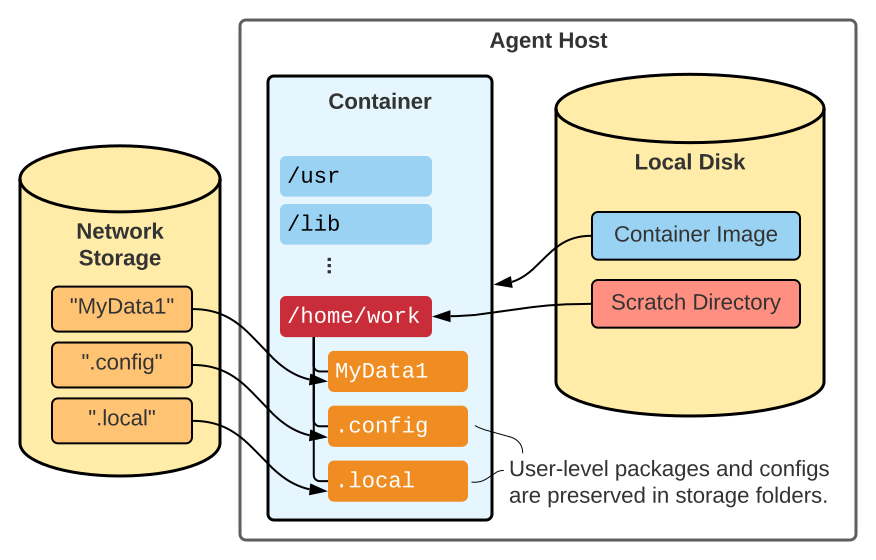 Figure 4. Storage structure when using "dotfolders" in Backend.AI
Practical Example: Python Package Installation
For example, when installing packages in Python, using the --user option like pip install --user {pkgname} installs them in paths like ~/.local/lib/python3.9/site-packages/{pkgname} under the home directory. (Please note that Python's major.minor version number is included in the path!)
If you register ~/.local/bin in the PATH environment variable, scripts and commands installed with packages can be used just like system-installed packages.
Version Compatibility Considerations
It's important to note that some programs are version-specific. For example, packages installed with pip install --user in a container using Python 3.8 will not be accessible in a container using Python 3.6 because the two Python versions look at different installation paths. However, if containers use the same Python version, you can see that previously installed packages work seamlessly, even when using different images.
Conclusion
Many Backend.AI users are familiar with traditional virtual machine concepts but are often unfamiliar with storage management concepts for containers with volatile file systems. In this blog post, we examined how storage is integrated with Backend.AI's session containers and explored the auto-mount folder feature that helps manage user-level packages and configurations to create personalized development environments. We hope you will use Backend.AI more conveniently in the future!
Footnotes
-
Backend.AI does provide limited functionality to import existing general container images and register metadata for use in Backend.AI, but this does not go through running sessions. We plan to provide more sophisticated customization for this feature in the future. ↩
