Mar 8, 2021
Engineering
Optimizing File List Retrieval for Backend.AI Storage Folders

Joongi Kim
Co-Founder / CTO
Mar 8, 2021
Engineering
Optimizing File List Retrieval for Backend.AI Storage Folders
Joongi Kim
Co-Founder / CTO
Backend.AI provides a storage folder feature that allows users to manage permanently stored I/O data and source code that persists even after their computational sessions running in containers are terminated.
In typical configurations, these storage folders are provided by mounting storage nodes within the cluster via NFS. This ensures that regardless of which agent node executes a user's computational session, each user's computation code can always access the same storage folders in the same way (mounted as subfolders under /home/work within the container).
However, when using filesystems accessed over the network, even with fast storage and network speeds, reading and writing hundreds of thousands to millions of files still creates significant performance overhead, and in worst-case scenarios, can even cause system crashes.
As a simple example, when a single folder contains millions of files, even listing the files with the ls command can take several minutes or more.
To mitigate this issue, Lablup recommends the following two approaches to users:
- When expecting more than 10,000 files in a single folder, apply a multi-level directory structure by hashing file names and using prefixes of 2 or more levels.
- Use more efficient system calls when retrieving file lists to reduce performance overhead through batching effects.
Let's examine each method in detail.
Applying Multi-level Prefix Directories by Hashing File Names
This technique is adopted by many software applications that store numerous objects as files.
For example, if a file's name or content-based hash value is abcdef12345, the path ab/cd/ef12345 would be used.
As a common example, git stores object files representing changes in each commit as follows:
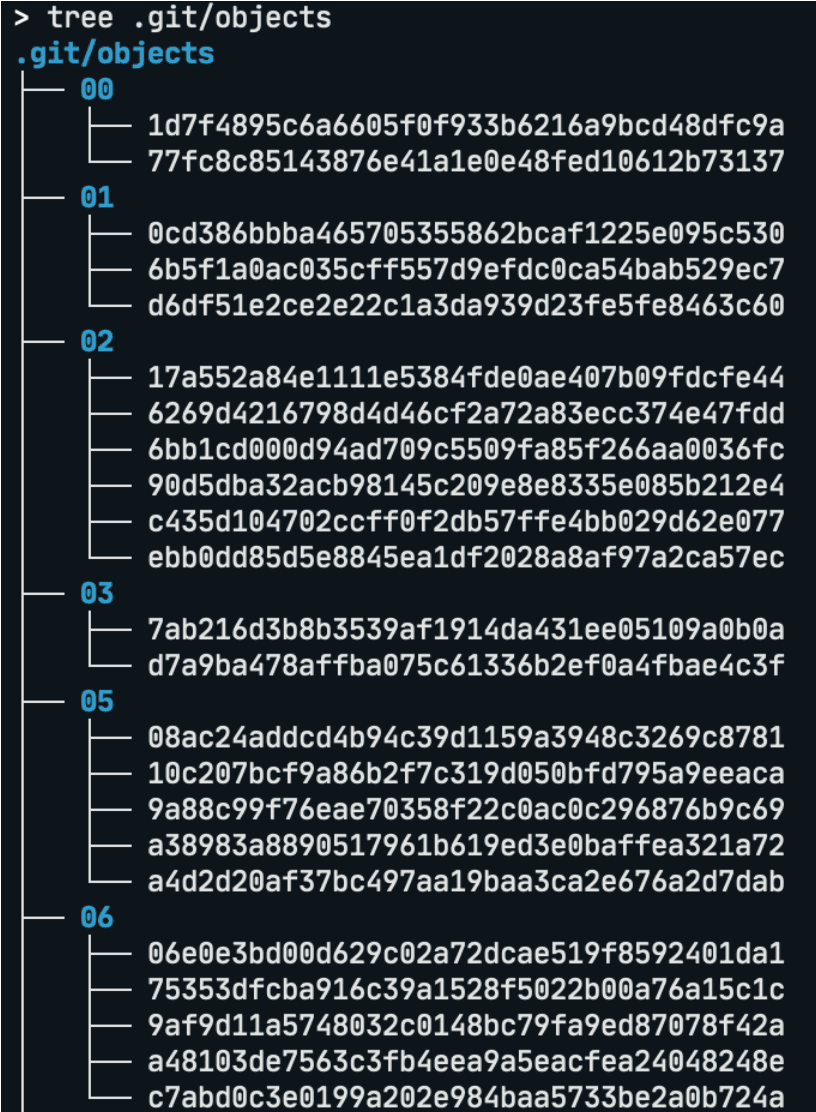
Fig.1 Example of running the tree command on a .git directory
In the git example above, only the first two characters of the hash are used to create a single level of directory depth. However, when dealing with more files, methods using 2-character chunks in 2 levels can be employed.
In a hexadecimal hash string, a 2-character fragment has 256 possible combinations. So with a total of 1 million files, using 2-level depth would result in a total of 256 × 256 = 65,536 directories, with each directory containing an average of about 15 files.
In other words, there would be 256 directories under the top-level directory, each containing another 256 directories, with around 15 files in each of those.
While listing all files still takes a long time, this approach provides the following advantages:
- Listing at the individual directory level is much faster.
- Even with frequent file additions and deletions, fewer modifications occur to individual directories in the filesystem, resulting in relatively lower synchronization overhead when reading and writing other files.
However, there are some considerations:
- The uniformity of distribution can vary depending on which hash function is used.
- Care must be taken when implementing logic for creating hierarchical directories during file addition or removing empty directories during deletion.
Applying File List Retrieval Batching Using the getdents() System Call
This method focuses on making the file listing operation itself faster.
Python's os.walk() and os.scandir() functions, which are commonly used by users for writing machine learning code, as well as the UNIX standard command ls, internally use a libc function called readdir().
Programs using readdir() must first obtain a directory scan session for the target directory using the opendir() function, then repeatedly retrieve file information one by one based on that session, and finally terminate the current session with the closedir() function.
While this works fine with a small number of files, as the file count increases, this approach suffers from growing overhead since it requires library and system call invocations for each individual file information retrieval.
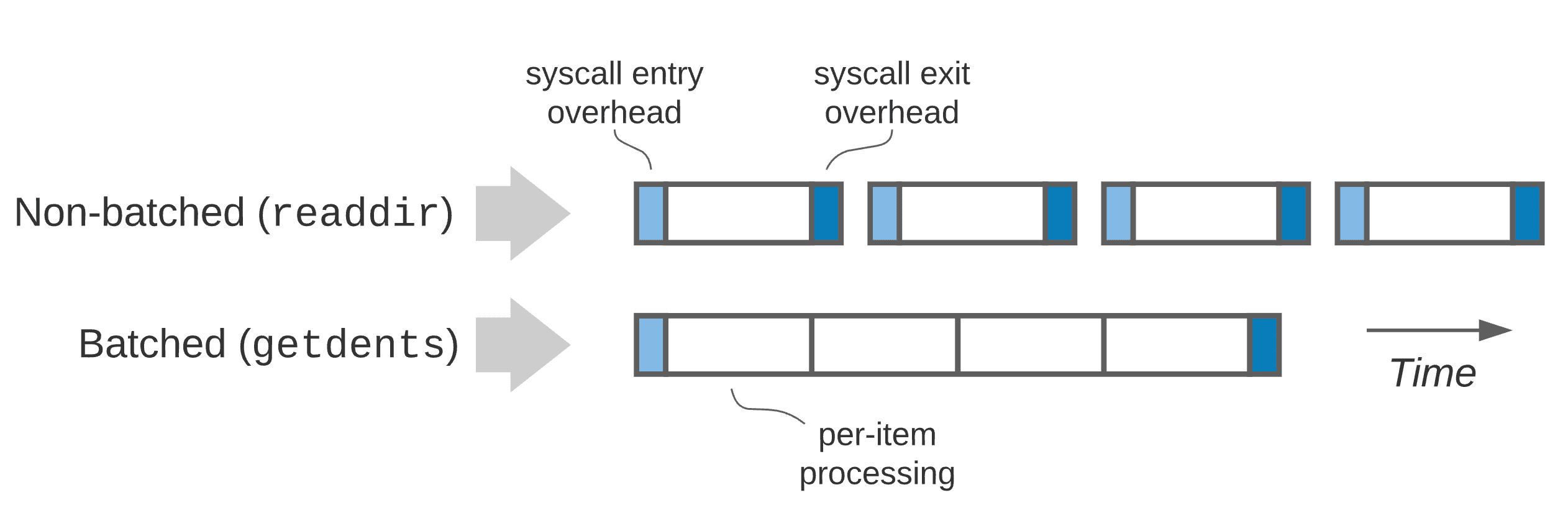
Fig.2 Benefits of batching getdents system calls
To address this issue, the getdents() system call was introduced.
Historically, the readdir() family of libc functions mentioned above were created as wrappers around corresponding system calls, but current Linux kernels all use the getdents() family of system calls.
getdents() works by opening a directory like a regular file through the open() system call, then reading the file's contents using the getdents() system call instead of read(). The key advantage is that you can arbitrarily specify the buffer size to use for each call.
While the actual number of entries read may vary slightly depending on the filename length distribution, it offers the advantage of being able to retrieve hundreds to thousands of file information entries at once.
The problem here is that the existing readdir() interface, which is maintained for compatibility, doesn't allow the caller to specify the buffer size.
Therefore, the library must use a predetermined buffer size. Looking at glibc's POSIX-compliant implementation, it uses approximately 32 KiB as the default size.
The specific size may vary depending on the glibc version, but it's typically in the tens of KiB range.1
Therefore, programs should be written to take advantage of getdents() directly, where the buffer size can be specified, rather than going through the existing readdir() interface.
In Python, using the python-getdents package allows you to easily utilize getdents() without complex coding, as follows:
As an experiment, I created a t3.large instance on AWS EC2, mounted an EFS partition within the same region, created 1 million 1-byte files, and compared directory listing performance. On initial access, both methods consumed similar total latency of about 1 minute. However, the time spent in user and kernel processes (excluding I/O) was reduced to about 1/3 with getdents(). After the directory contents were cached in the system's buffer cache, there was an average difference of more than 4x in total latency (scandir took 3.1 seconds, while getdents took 0.7 seconds).
In other words, while it doesn't reduce the network information retrieval itself, in situations where repeated read/write operations and file list queries occur, we can expect performance improvements through more aggressive batching than glibc's default behavior.
Summary
We've examined two user-side techniques to reduce performance overhead caused by large numbers of files when using network filesystems.
Even with fast storage and networks, by appropriately combining these techniques, you can improve system stability and reduce unnecessary filesystem synchronization overhead.
I hope this article helps not only Backend.AI users but also those working on large-scale data analysis tasks.
Footnotes
-
glibc 2.35 uses approximately 32 KiB as the default. ↩
