
We're pleased to share the improvements in the March 2021 update for Backend.AI 21.03 / Enterprise R2!
Backend.AI 20.09 / Enterprise R2 also receives updates with major bug fixes and essential feature improvements.
- Manager: 21.03.18 / 20.09.27
- Agent: 21.03.8 / 20.09.11
- Common: 21.03.4 / 20.09.10
- Client SDK: 21.03.5 / 20.09.7
- Storage-proxy: 21.03.0 / 20.09.1
- WebServer: 21.03.7 / 20.09.16
- WebUI: 21.03.8
- Control Panel: 20.09.11
Features for Administrators and Developers
Utilization-based Automatic Session Termination Feature (21.03)
Administrators can now specify automatic session termination conditions based on CPU, memory, and GPU utilization rates. For example, you can set sessions with CPU usage below 5% for a certain period to be automatically terminated.
 Dialog for setting session auto-termination conditions based on resource usage
Support for Generalized Query Filter and Order Expressions (21.03 / 20.09)
When querying paginated lists of agents, compute sessions, users, keypairs, vfolders, etc. through Backend.AI Manager's GraphQL API, you can now pass flexibly combined conditional expressions using scalar fields of each object. For example, you can specify conditional expressions like status in ["PENDING", "SCHEDULED", "PREPARING"] & created_at > "2021-07-01" as a filter string argument. Additionally, through the order string argument, you can specify ascending and descending sort methods for multiple fields like +status,-created_at.
Standard-compliant GraphQL Endpoint Support (21.03 / 20.09)
The existing /admin/graphql API in Backend.AI Manager had compatibility issues with some GraphQL clients and development tools. This was because the message format returned when query processing errors occurred differed from the GraphQL standard. A new /admin/gql API that fully complies with the standard has now been added. The GraphQL request method and supported schema are completely identical.
Enhanced Batch-type Session Execution Support (21.03 / 20.09)
Batch-type session execution, which was previously unreliable due to bugs, is now properly supported. Batch-type sessions automatically execute the startup command specified during session creation simultaneously with session creation, automatically terminate when execution is complete, and record success/failure status based on the exit code. (Bug fixes: issues where startup commands might not start execution under certain conditions, and problems where idle timeout was abnormally applied to batch-type sessions that don't interact with users)
Official Introduction of Session Template Feature (21.03)
In addition to the existing resource template feature where administrators pre-specify resource amounts for users to select, we have completed beta testing and officially introduced the session template feature. This new feature allows pre-specification of all session values including environment, multi-cluster settings, virtual storage mounts, and environment variables. This is useful for corporate organizations and educational institutions that need pre-configured environments that can be launched with a single click. Currently supports CLI configuration, with GUI-related features planned for the next WebUI release.
General Features for Users
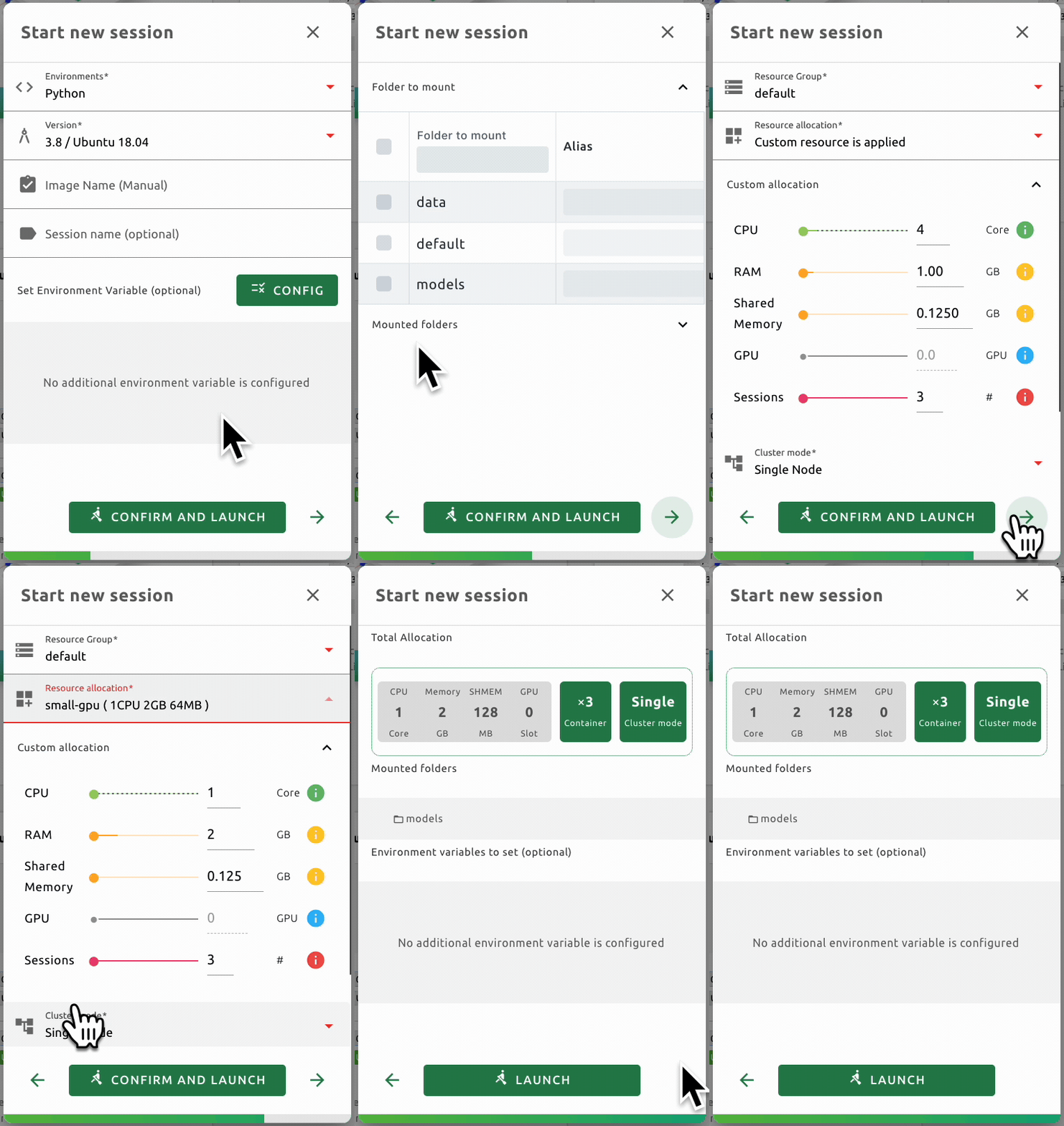
Wizard-style Session Creation Dialog (21.03 / 20.09)
The session creation dialog now allows you to specify various options such as resource allocation, environment variables, and storage folder mounting in a wizard format with step-by-step progression.
Alias Specification for Storage Folders Used in Sessions (21.03 / 20.09)
During session creation, you can change how storage folders appear under the /home/work directory within sessions. For example, a storage folder named "sample_data" can be mounted at the path /home/work/data instead of /home/work/sample_data.
Support for Session Creation Using Arbitrary Images from Specified Repositories (21.03)
Users can now directly input images that exist in repositories like Docker Hub or Harbor but couldn't previously be retrieved by agents. By following the proper format, users can create sessions with those images. If repositories and repository sub-projects are registered, users can directly input and retrieve desired images without having to request them from administrators each time.
New Multilingual Interface (21.03 / 20.09)
Russian and French interfaces are now supported.
Development and Research Framework Support
TensorFlow 2.5 / CUDA 11.3 Support
- TensorFlow 2.5 is now supported along with CUDA 11.3.
