Sep 23, 2026
Engineering
Building a Unified AI Accelerator Testbed on OpenStack and Public Cloud

Yubin Kim
Software Engineer
Sep 23, 2026
Engineering
Building a Unified AI Accelerator Testbed on OpenStack and Public Cloud
Yubin Kim
Software Engineer
This article is adapted from a presentation at 2026 OCP Korea Tech Day.
Backend.AI, developed by Lablup, runs on a range of AI accelerators, including NVIDIA and AMD GPUs, Intel accelerators, and NPUs developed in Korea. Every new accelerator therefore needs to be validated on physical hardware. As the number of hardware platforms we need to test has grown in recent years, preparing and operating the test environments has become a significant task in its own right. This article describes the challenges we encountered while building an internal testbed to reduce that work, and how we addressed them.
The changing AI accelerator landscape
A few years ago, NVIDIA dominated the AI accelerator market. Today, AMD's Instinct MI350 series (CDNA 4) is available through major cloud providers, while Intel continues to expand its offerings with Gaudi and B70 cards. In Korea, FuriosaAI's RNGD and Rebellions' ATOM have reached production and commercial deployment. The software stack has also expanded beyond CUDA to include ROCm, SynapseAI, and vendor-specific SDKs.
| Vendor | Product | Specifications and Status |
|---|---|---|
| NVIDIA | GB10 (DGX Spark) | 128 GB unified memory, Arm64, 1 PFLOPS at FP4 |
| AMD | Instinct MI355X | 288 GB HBM3e, 8 TB/s, CDNA 4, ROCm 7 |
| Intel | Gaudi 3 | 128 GB HBM2e, RDMA scale-out |
| FuriosaAI | RNGD | HBM-equipped NPU in production; target of 20,000 units in 2026 |
| Rebellions | ATOM-Max / REBEL | Commercial deployment on KT Cloud; REBEL has 144 GB HBM3e |
| HyperAccel | LPU | Architecture designed for LLM inference |
Table 1. Major AI accelerators as of 2026
The underlying hardware assumptions are changing, too. Traditionally, an x86 host and its GPU had separate memory pools: system RAM and dedicated VRAM. Systems such as the GB10 and GH200 instead pair an Arm64 host with a CPU and GPU that share a unified memory pool. Even within NVIDIA's product line, the architecture varies by generation.

Figure 1. Changing memory architectures. In a conventional x86 system, the CPU and GPU connect over PCIe and use separate RAM and VRAM. In GB10 and GH200 systems, they share a unified memory pool.
For a platform team, support is no longer a matter of adding a few GPU models. We need to validate combinations of hardware architectures and software stacks, and new hardware arrives more frequently. That called for a test environment that could keep up.
The scope of validation
Backend.AI is an open-source platform for AI development and services. It supports AI accelerators through plugins that are separate from the core. A new accelerator can be added by installing a plugin without modifying the node controller. The scheduler works with resource-slot vectors, so it can schedule heterogeneous resources through a common mechanism.
Backend.AI currently has plugins for nine vendors: NVIDIA (with discrete, fGPU, MIG, and unified allocation modes), AMD, Intel Gaudi, Google TPU, FuriosaAI, Rebellions, HyperAccel, Tenstorrent, and Graphcore. Across those vendors, it supports more than 12 device models.
Even a single NVIDIA GPU can be shared in several ways. Two established approaches are MIG and MPS.
- MIG: Maps virtual devices to hardware partitions based on GPU processing clusters (GPCs), providing strong performance and security isolation. Partition sizes are fixed, however, changing them requires a GPU reset, and multi-GPU allocation is not supported.
- MPS: Lets workloads share a single CUDA context at the user level, allowing flexible fractional allocation. The trade-off is that a failure in one process can affect other workloads sharing the context.
Backend.AI's fGPU isolates the CUDA context of each workload at the driver level. It retains the flexibility of runtime allocation associated with MPS while preventing failures from spreading between workloads. It can also be combined with MIG when needed. Performance isolation, however, still depends on the GPU's internal scheduler and is therefore less predictable.
Because fGPU depends directly on the internal behavior of NVIDIA drivers, it requires separate builds for different driver versions and must be validated again when a new GPU generation arrives. Building an environment for that validation became a priority for our team.
Why we need bare metal and cloud
Effective validation requires both bare-metal and cloud environments.
아래 내용도 표로 만들어봅시다:
VendorProductSpecifications and status NVIDIA GB10 (DGX Spark) 128 GB unified memory, Arm64, 1 PFLOPS at FP4 AMD Instinct MI355X 288 GB HBM3e, 8 TB/s, CDNA 4, ROCm 7 Intel Gaudi 3 128 GB HBM2e, RDMA scale-out FuriosaAI RNGD HBM-equipped NPU in production; target of 20,000 units in 2026 Rebellions ATOM-Max / REBEL Commercial deployment on KT Cloud; REBEL has 144 GB HBM3e HyperAccel LPU Architecture designed for LLM inference
| Vendor | Product | Specifications and Status |
|---|---|---|
| NVIDIA | GB10 (DGX Spark) | 128 GB unified memory, Arm64, 1 PFLOPS at FP4 |
| AMD | Instinct MI355X | 288 GB HBM3e, 8 TB/s, CDNA 4, ROCm 7 |
| Intel | Gaudi 3 | 128 GB HBM2e, RDMA scale-out |
| FuriosaAI | RNGD | HBM-equipped NPU in production; target of 20,000 units in 2026 |
| Rebellions | ATOM-Max / REBEL | Commercial deployment on KT Cloud; REBEL has 144 GB HBM3e |
| HyperAccel | LPU | Architecture designed for LLM inference |
| Validation need | Bare metal | Cloud |
|---|---|---|
| Korean NPUs (FuriosaAI, Rebellions, HyperAccel) | Required | Not available |
| Unified memory (GB10 / DGX Spark) | Required | Not available |
| Reproducing a customer environment tied to a provider | Not suitable | Required |
| Obtaining many instances for a short test period | Inefficient | Required |
| Validation Need | Bare Metal | Cloud |
|---|---|---|
| Korean NPUs (FuriosaAI, Rebellions, HyperAccel) | Required | Not available |
| Unified memory (GB10 / DGX Spark) | Required | Not available |
| Reproducing a customer environment tied to a provider | Not suitable | Required |
| Obtaining many instances for a short test period | Inefficient | Required |
Korean NPUs and newer unified-memory systems are not available as public cloud instances, so we must test them on bare metal. Conversely, the cloud is necessary when we need to reproduce a customer environment tied to a particular provider or temporarily provision a large number of instances.
We decided to bring these two operationally different environments together in one platform, with three design requirements:
- Support diverse hardware: Handle x86, Arm64, GPUs, and NPUs through one pipeline rather than maintaining separate operating procedures for each platform.
- Reclaim and reallocate bare-metal nodes: Reset a returned node and remove the previous user's configuration without manual intervention.
- Provide a consistent interface: Use the same request, access, and reclamation workflows for bare metal and cloud, regardless of provider.
Provider integration and platform design
Architecture
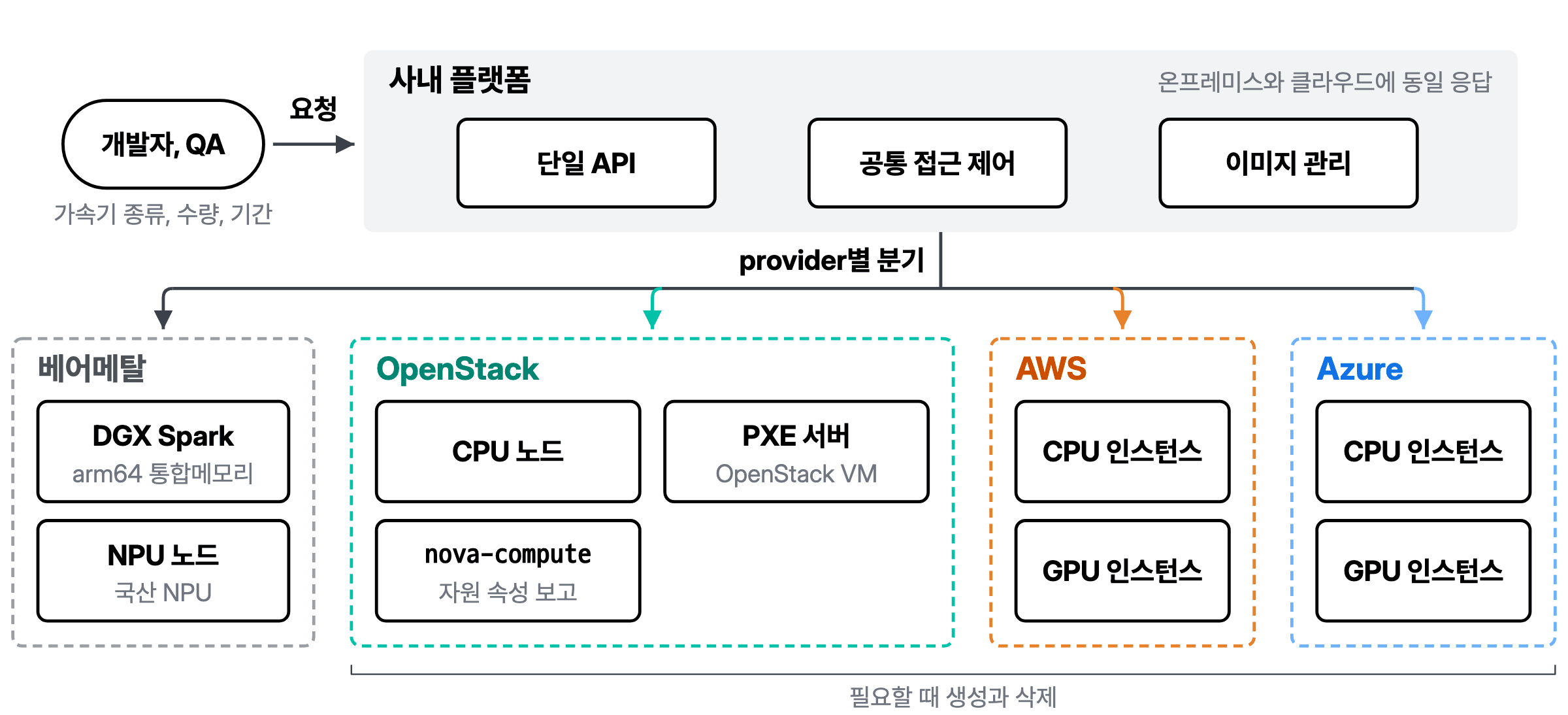
Figure 2. Unified testbed architecture. Requests from developers and QA enter through a single internal API, then pass through provider-specific drivers to bare metal, OpenStack, AWS, or Azure.
The platform has three layers: users, an abstraction layer, and providers such as our internal OpenStack deployment, AWS, and bare metal. Users select a provider and instance type, then submit a request through the abstraction layer. That layer handles each provider's provisioning, access, and reclamation procedures. The user follows the same workflow and receives a consistently prepared environment regardless of the provider selected.
Deciding what to abstract
We applied one rule when designing the abstraction layer: standardize only the operations that have the same meaning across providers.
On that basis, we standardized instance creation, lookup, termination, and reclamation; image registration and deployment; network and access-control models; and key-pair and snapshot management. A security group, for example, answers the same question in AWS and OpenStack: which ports should be open? It can therefore be represented by a common model. Instance-type performance and provider-specific billing work differently, so we did not try to normalize them. Users need the provider's original information to choose an instance type and assess cost, so we expose it as provided.
Keeping the abstraction narrow means we can add a provider by implementing a driver without changing the core. A new bare-metal node can join the platform by being registered in the inventory.
Consolidating internal resources
We first consolidated computing nodes that had been scattered across the company into an OpenStack cluster. Previously, teams managed equipment independently. Knowing whether a node was occupied often depended on asking the person responsible for it. Other teams could not use idle resources, and even identical hardware could have different operating systems and configurations. After consolidation, teams could check availability in one place and provision idle resources with the environment they needed.
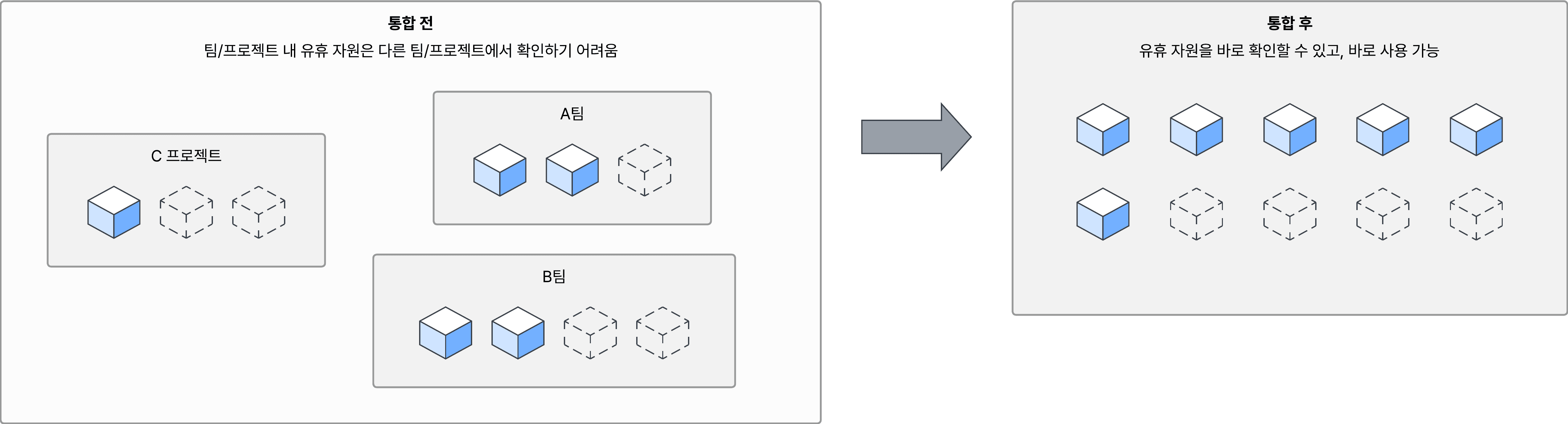
Figure 3. Internal compute resources before and after consolidation. Previously, idle resources (dashed outlines) were hidden within team and project boundaries. In the shared pool, they are visible and available for use.
Optimizing the image pipeline
Once the resources were consolidated, image preparation became the next bottleneck. Providers supplied different base images, so validating a particular Backend.AI version required about 40 minutes of manual installation each time. Some test environments were also available only from specific providers.
We addressed this by managing image definitions centrally in the internal platform and building a Packer-based image pipeline. Each Backend.AI release now triggers the automatic creation of updated images for every provider. We also supply images for environments needed in validation, including Rocky Linux and CentOS. Environment preparation time fell from 40 minutes to 15 minutes.
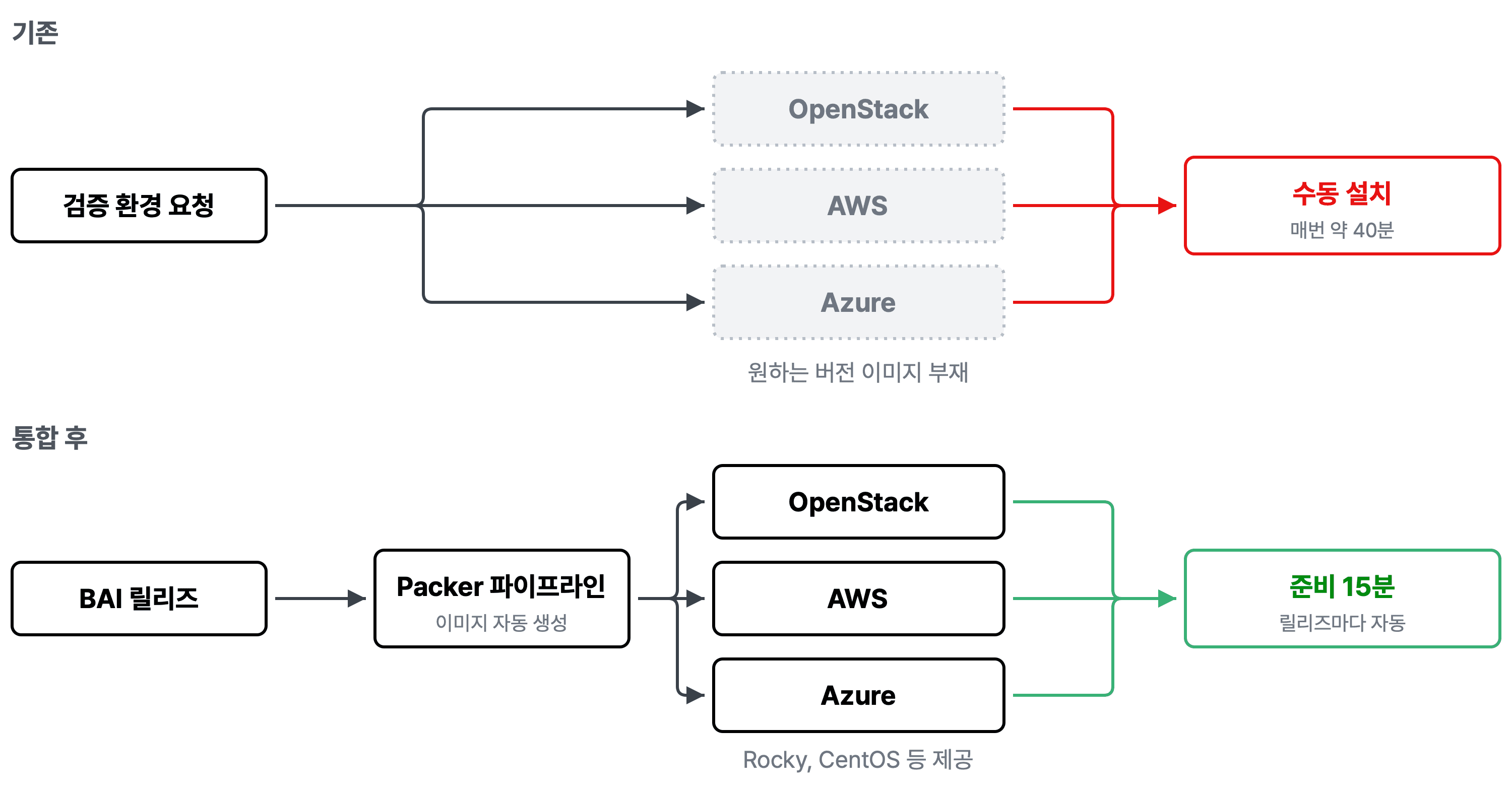
Figure 4. Changes to image preparation. Previously, missing provider-specific images meant roughly 40 minutes of manual installation for each test. The Packer pipeline now builds provider-specific images for each Backend.AI release, reducing preparation time to 15 minutes.
Standardizing instance reclamation
After images, we turned to reclamation. Instance termination and provisioning-failure cleanup followed different procedures for each provider. If a step was missed, a cloud instance kept accruing charges or an unused bare-metal node remained marked as occupied.
We consolidated reclamation into a single state transition in the common API. The system retries failures and checks for remaining resources after termination. In the cloud, it deletes the instance and associated resources. For bare metal, it releases the allocation in the database, then uses an agent in the VM to initiate reinstallation through PXE network boot. Once reclamation is complete, the node returns to the available pool. Previously, about five resources per month were left unreclaimed; that number fell to zero.
Automating bare-metal provisioning
What remains on a returned node
For a cloud instance, deletion completes the cleanup. A bare-metal node is different: driver versions, kernel parameters, and runtimes installed by the previous user remain on its disk. If the environment is contaminated, a failed test becomes difficult to diagnose. We cannot easily tell whether the code or the node configuration caused it. Manual cleanup requires physical access or a remote console, and reinstalling and configuring the OS takes considerable time on every return.
Reinstalling through PXE
We automated the reset process using PXE, a network-boot standard supported by server firmware. Rather than booting from its local disk, a node obtains an IP address through DHCP along with information about the installation server. It then retrieves a bootloader and an OS image from that server. A single installation server can reinstall nodes with a clean OS regardless of what is on their disks.
Our pipeline starts when a node is returned. It changes the boot order to network boot and restarts the node, which downloads the installation image and installs a fresh OS. On first boot, the system configures accounts, networking, and the agent automatically. After the agent passes a health check, the node returns to the available pool. Only the boot path varies by hardware; all other stages are shared, and the process requires no manual intervention.
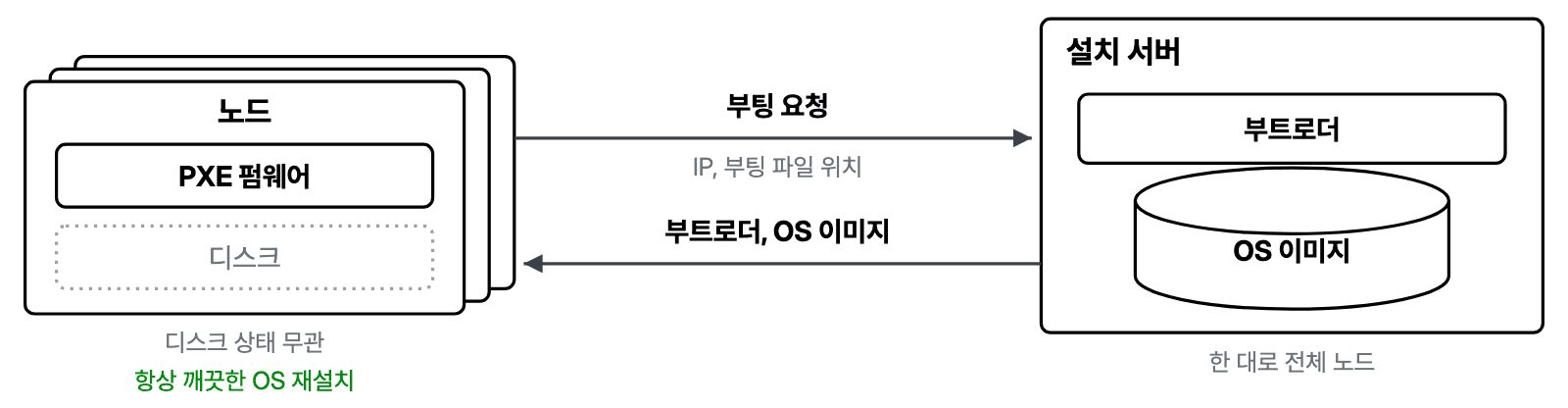
Figure 5. PXE boot overview. A node's PXE firmware requests a network boot, and the installation server supplies the bootloader and OS image. One server handles all nodes and can reinstall a clean OS regardless of each node's disk state.
Integrating DGX Spark
DGX Spark has an Arm64 host and unified memory, unlike the x86 servers assumed by the original pipeline. Our goal was to handle everything from reclamation and automatic reinstallation to cluster enrollment through the same pipeline, without manual intervention.
We encountered three issues during integration:
- Network transfer failure in the bootloader: When we tried to boot over the network using the standard GRUB path, the node downloaded the kernel but stopped while retrieving the second file with a “couldn't send network packet” error. Investigation pointed to firmware rather than GRUB itself. The firmware failed to handle the EFI_RNG_PROTOCOL request for randomness required by each new connection, so network connections after the first request failed. Since we could not change the firmware, we replaced GRUB with iPXE (
snponly.efi), which uses the firmware's network stack. - Boot not completing after installation: Once we resolved the bootloader issue, the installed node still failed to complete booting, even after several hours. Its default systemd target was
graphical.target, and GUI session initialization on a headless node prevented the boot process from completing. In theory, the wait could last 15 hours. The testbed nodes do not need a GUI, so we switched the default tomulti-user.targetand disabled the first-boot setup services. This reduced a wait of several hours to tens of seconds after boot. - Duplicate hostnames: Installing every node from the same image gave them all the same default hostname. We added a first-boot service that assigns a unique hostname using the last digits of each node's MAC address.
After these changes, the full process from reinstallation trigger to completed boot took 22 minutes. The system then checks the node's status and enrolls it in the cluster automatically. We accommodated Spark by adding a boot-path branch to the existing pipeline rather than creating a separate one.
Operational results
| Metric | Before | Now |
|---|---|---|
| Time from node return to reallocation | Over 1 hour manually; more than a day if the responsible person was unavailable | 30 minutes automated |
| Time to begin validating a new AI accelerator | Several days | Within 1 day |
| Node utilization | Approximately 50% (estimate; no measurement system was available) | 80% (resources managed through the platform) |
Table 2. Testbed operations before and after integration
Work remains. We do not yet track cloud spending separately, so we need metrics for cost forecasting. We also plan to use per-user audit logs to understand how the platform is used and identify improvements.
Looking ahead
The testbed continues to expand as new AI accelerators arrive. We plan to integrate each one into the existing pipeline rather than create a dedicated operating procedure for every hardware platform.
