Sep 11, 2026
Engineering
Introducing AI:GO: Personal Agentic AI Platform

Daemyung Kang
Software Engineer
Sep 11, 2026
Engineering
Introducing AI:GO: Personal Agentic AI Platform
Daemyung Kang
Software Engineer
Lablup has released AI:GO, a Personal Agentic AI Platform that lets you create and run AI Squads composed of multiple AI agents right on your personal computer.
You can download AI:GOfor free from go.backend.ai for macOS, Windows, and Linux. The platform is designed from the ground up to run models on your own hardware and keep sensitive data under your control. Beyond just providing AI Squad capabilities, AI:GO includes all the essential features you would expect from an LLM serving engine. This foundation is necessary because running agentic AI workloads requires stable management of multiple LLMs.
Core Features of an LLM Serving Engine
An LLM serving engine's primary job is to return inference results from LLM models. However, a serving engine alone does not guarantee a smooth user experience. You need more than just inference capabilities. Users should be able to easily find and download models, and since the same model comes in multiple versions with different sizes, quantization methods, and context lengths, you also need proper model and file management. Modern platforms must support various formats including GGUF (commonly used in local LLMs), Safetensors (used on Apple Silicon and GPU servers), and CKPT (primarily for image generation models).
You also need inference engines that match your execution environment. For CPU-based or standard PC execution, llama.cpp works well. On Apple Silicon, you can choose engines like MLX that deliver significantly better performance. When high throughput on NVIDIA GPUs matters, engines like vLLM or SGLang become the right choice. Supporting multiple engines is therefore essential.
Since users download different models for different purposes, the platform must allow switching between models as needed and provide an OpenAI-compatible API so external programs can call these models. AI:GO brings all these capabilities together in a single desktop application.
| Category | Key Features |
|---|---|
| Model Management | Search, download, install, and delete models |
| Model Formats | Support for GGUF, Safetensors, and more |
| Inference Engines | Choose engines that match your hardware |
| Multi-Model Support | Manage installation and execution status of multiple models |
| User Interface | Model selection and chat |
| External Integration | OpenAI-compatible API |
| Status Monitoring | Check memory usage and model execution status |
Support for Multiple Models and Inference Engines
AI:GO supports various model formats including GGUF and Safetensors. GGUF models run on llama.cpp, while Apple Silicon users can choose mlx-lm or MLXcel developed by Lablup. For image generation, stable-diffusion.cpp is available. The table below shows the inference engines supported by AI:GO and their execution environments.
| Inference Engine | Model Format | Primary Execution Environment |
|---|---|---|
| llama.cpp | GGUF | CPU, NVIDIA·AMD·Intel GPU, Apple Silicon |
| MLX LM | Safetensors, GGUF | Apple Silicon |
| MLXcel | Safetensors | Apple Silicon |
| stable-diffusion.cpp | Safetensors, CKPT, GGUF | Image generation |
| vLLM | Safetensors, AWQ, GPTQ, and others | NVIDIA GPU |
The vLLM server can be connected as a backend, and you can also connect other OpenAI-compatible servers like SGLang.
Beyond local models, you can connect OpenAI, Anthropic, Gemini, and other OpenAI-compatible APIs. This means you can combine local and cloud models depending on your workload requirements.
Comparison with Existing LLM Serving Engines
Ollama is widely used for running local LLMs on personal computers, while vLLM and SGLang are commonly chosen for server environments that need to handle many requests. AI:GO shares the basic capability of downloading and running models with these tools, but its scope differs.
| Category | AI:GO | Ollama | vLLM | SGLang |
|---|---|---|---|---|
| Core Identity | Personal Agentic AI Platform | Local model runner | High-performance inference engine | High-performance inference framework |
| Primary Audience | Individuals, developers | Individuals, developers | Servers, production services | Servers, large-scale inference |
| Model Search & Download | Supported | Supported | Managed separately | Managed separately |
| Multi-Model Management | Supported | Supported | Per-model server focus | Gateway configuration possible |
| Multiple Inference Engines | Supported | Not supported | Not supported | Not supported |
| Local Chat UI | Supported | Supported | Separate UI required | Separate UI required |
| Cloud Model Connection | Supported | Ollama Cloud focused | Not directly supported | Gateway configuration possible |
| OpenAI-Compatible API | Supported | Supported | Supported | Supported |
| Tool Calling | Supported | Supported | Supported | Supported |
| Tool Execution Loop | Supported | Requires external program | Separate implementation needed | Supported depending on configuration |
| MCP Integration | Supported | Requires external program | Tool Server configuration | Supported via Gateway |
| Multi-Agent Collaboration | AI Squad provided | Separate framework required | Separate framework required | Separate configuration required |
vLLM and SGLang prioritize efficient GPU utilization while handling many inference requests. Ollama focuses on making it simple to download and run local models. AI:GO centers on managing multiple models and inference engines, then running agents and AI Squads on top of that foundation.
From Model Serving to Agent Execution
Just because a model supports Tool Calling does not mean tools execute automatically. The model returns which tool to call with which arguments. Your actual program must interpret this, execute the tool, and pass the execution result back to the model. You also need an Agent Loop that repeats this process so the model can review results and decide on the next action.
When using Ollama or vLLM, you typically implement this part in a separate program or agent framework. AI:GOhandles tool execution and the Agent Loop within the application itself. Built-in agents naturally perform tasks ranging from file editing to code execution inside a security-hardened local sandbox. You can also connect MCP servers, enabling agents to use file systems, databases, external APIs, or custom tools you create.
Each agent can have different configurations:
- The model it uses
- Its system prompt
- Available tools
- Execution permissions for each tool
- Maximum tokens and execution limits
These features cover what you need to run a single agent. AI:GO goes one step further by providing AI Squad, which brings multiple agents together as a team.
The Heart of AI:GO: AI Squad
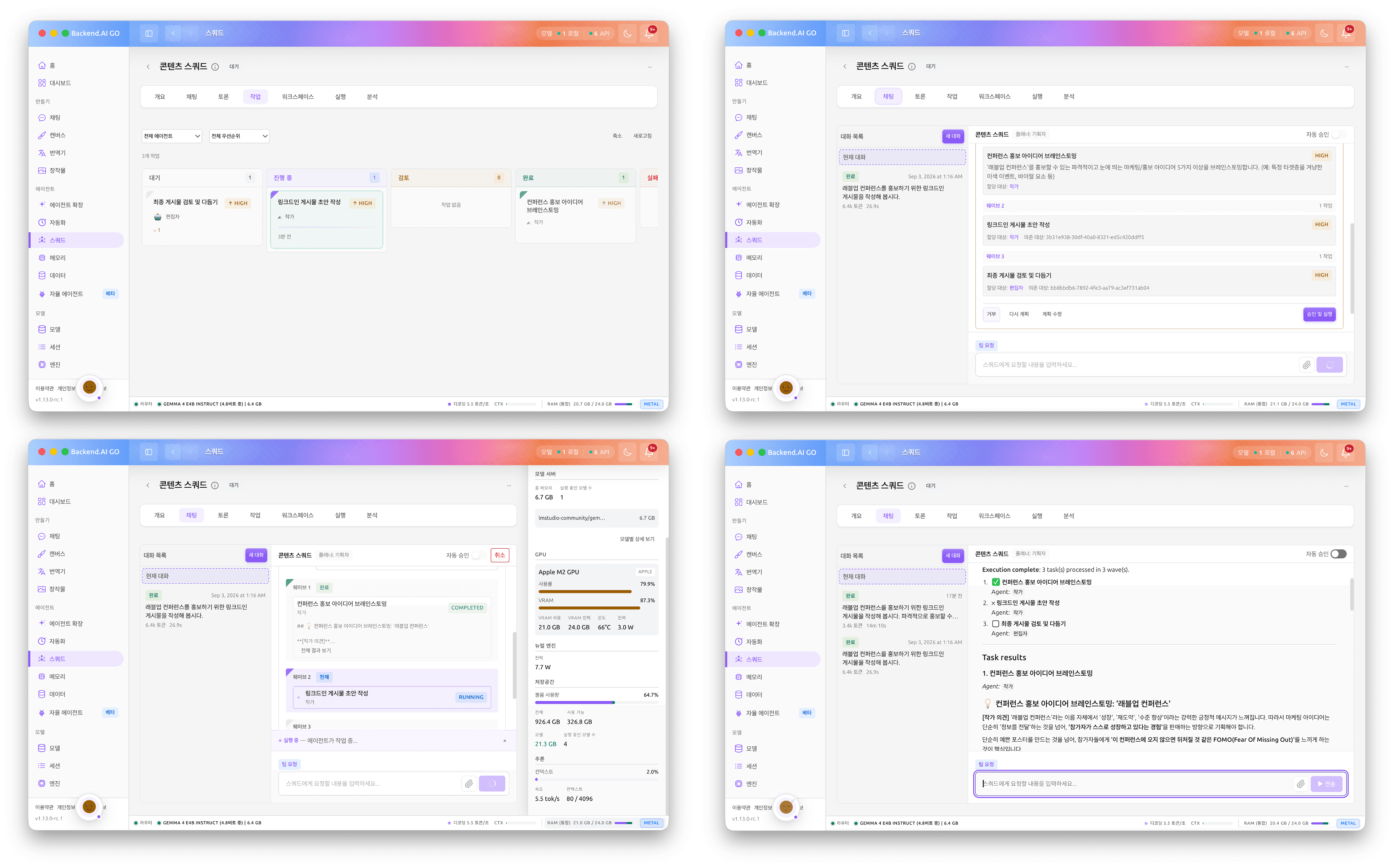
AI Squad enables multiple agents with different roles to divide and perform tasks. For example, you could configure a Squad for writing technical documentation as follows:
| Agent | Role |
|---|---|
| Researcher | Gather relevant materials and evidence |
| Analyst | Analyze meaning and trade-offs of collected materials |
| Writer | Organize analysis results into documents |
| Reviewer | Verify facts and logic |
| Orchestrator | Distribute tasks and consolidate results |
You can assign different models to different agents. Simple material classification might use a small local model, while complex analysis could use a model with strong reasoning capabilities. You can also configure sensitive materials to be processed by local models while delegating only certain tasks to cloud models.
Tools and permissions can also be specified separately for each agent. An agent that searches for materials might get search tools, while an agent that writes documents might receive file creation permissions.
Tasks generated in a Squad appear on the task board. You can see the responsible agent for each task, progress status, dependencies with other tasks, results, and errors. Files created by agents are stored in a shared workspace, so other agents can continue using them or users can check them directly.
You can also configure agents to discuss specific topics together. An agent acting as a moderator can manage speaking order and flow, or multiple agents can take turns offering opinions that build on earlier contributions.
The key point is that this is not simply running multiple chat sessions at the same time. It involves dividing work, assigning responsible agents, sharing intermediate results, and having other agents pick up those results to continue the workflow.
Personal Agentic AI Platform
AI:GO provides the foundation for assigning appropriate models to each agent, setting necessary tools and permissions, and then organizing multiple agents into a single Squad.
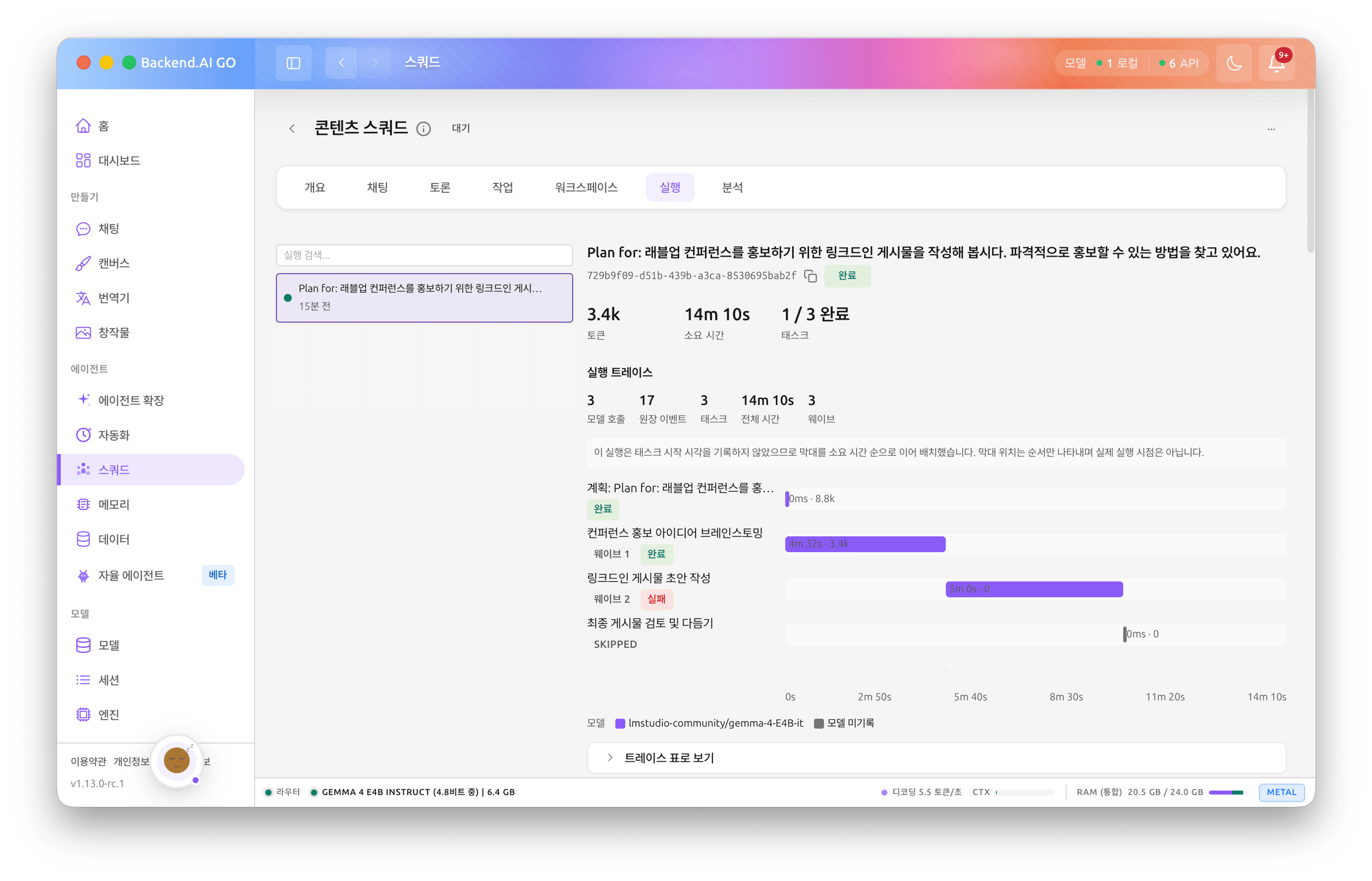
You can build AI Squads using existing LLM serving engines as well. However, you would need to configure the connections between model servers and agent frameworks, handle tool execution and task handoff between agents, and manage shared workspaces and execution states yourself.
AI:GO provides all of this within a desktop application.
You can start with a single laptop and, when needed, connect multiple GO instances on the same network to naturally expand into a GO Mesh covering your entire office. One powerful machine can assist other devices to create a larger workspace, and if you need an even bigger environment, you can scale directly to Backend.AI.
Enabling individuals to run multiple models on their own computers, configure those models as agents, and organize multiple agents into a single AI Squad. This is what AI:GO means by Personal Agentic AI Platform.
